Thursday, October 24, 2013

6th Legendary Creatures


Introduction
We will write a story about a made-up Legendary Creature, then use Adobe Photoshop to collage together photos to illustrate our creature. Here are some examples from last year.

Directions

1. Vocabulary
Use the Dictionary application for Vocabulary words

b. Myths, Legends, Fables and Folklore (answer the questions in your packet)
c. Look at these professional examples:

3. Sketch
Sketch in your packet

4. Write
Follow the directions on your worksheet, and us MSWord to write your legend.

5. Design

Monday, October 21, 2013

7th Media Arts: Fashion and Pattern design


Research


Try the two activities linked from caarts.blogspot.com
  1. Symmetry Activity
  2. Organic and Geometric Shapes
  3. Patterns 
  4. Practice making some patterns
Now lets look at some examples of print and pattern designs. Go to: Print and Pattern. Look through all of the examples (you can also go through the archives). Pick 3 and describe them. 
Follow the directions on your worksheets to design 3 different patterns and apply them to 3 different items. Have fun!

NEXT: Create an original fashion design! Ms. Fowler will give you directions

Champion Hoodie Remix (design a hoodie)
Nike iD (design a shoe)

Thursday, October 10, 2013

Painting and Drawing: Collage Portraits

1. Watch presentation and take notes
Mark Bradford videos, Mark Bradford Vimeo
Romare Bearden

2. Explore these websites:
Romare Bearden website
Collage Maker

3. Take a picture of yourself. Save it to the Fowler>Classroom>Paint/Draw folder. Ms. FOwler will print it. Trace onto white paper.


Extra Credit: Humanimal collage

Monday, October 7, 2013

8th Media Arts: Alice in Wonderland Posters


Your class has been hired to design posters for the musical "Alice in Wonderland Jr.".

Research 
First watch some movie clips and look at what other designers have done.

Links

Video Clips

Plan
Sketch an idea. You can design using copy-right free photos, or scan a drawing and edit on the computer

Design
Start by using the template. Go to Fowler-Classroom > Materials and copy the poster template to the desktop.

Evaluate and Critique.
One winner (or more) will be chosen to print professionally. Write an artist statement and do an online critique.

Friday, October 4, 2013

7 Media Arts: Photo Scavenger Hunt


History of Photography Video

  1. Camera Contract-read and sign
  2. Camera Settings
  3. Macro Photos
  4. Practice uploading photos
  5. Worksheet
    1. Link 1
    2. Link 2
  6. Photo Scavenger Hunt
  7. Create iMovie of photos: Examples
    • Upload photos to computer
    • Watch example movie
    • Import photos to iMovie
    • Edit down to best 10-15 photos
    • Add titles, captions and credits

    Tuesday, October 1, 2013

    6th Media Arts: Creature Photographs

    Creature Photographs
    1. Make a monster
    2. We will photograph our monsters in the wild! You must photography your monster in a minimum of 5 different habitats
    3. Make a slideshow

    Here are some links to help inspire you:
    Lots of monsters
    More Monsters


    Monday, September 30, 2013

    Painting and Drawing, Oct. 1

    1. Finish your "expand a picture"
    2. Contour line drawing

    3. Drawing animals using basic shapes
    4. Animal practice
    5. Charcoal value scale


    Tuesday, September 24, 2013

    Sept 27, 8 gold 2. Be a Media Critic

    8th graders, YOU HAVE NEVER DONE THIS PACKET! Don't even try to act like you have. You can work in partners or alone. Use headphones if you have them. This packet must be completed by the end of class, or it's a zero!!!

    Go to Artopia to complete the packet.

    Watch the One Minute Movie

    1. Click on "photography." Choose 1 photograph and write about what you see on your worksheet.
    2. Click on "do more", the "write about it." Write about how 2 different elements or principles of design are used.
    3. Write your opinion of the photo in complete sentences.

    4. Listen to one radio production and write about what you hear
    5. Write about how the producer expresses the message
    6. Write about your opinion of the production

    7. Choose a film and make a list of what you see
    8. Click on "more" under your film clip, the click on "do more," then "write about it." How are two elements or principles used? (use the "word back if you need too)
    9. What is your opinion and how did it make you feel?


    10. Choose a TV clip and make a list of what you see
    11. Click on "more" under your film clip, the click on "do more," then "write about it." How are two elements or principles used? (use the "word back if you need too)
    12. What is your opinion and how did it make you feel?


    13. make a list of what you see and hear
    14. How are two elements or principles used? 
    15. What is your opinion and how did it make you feel?

    Sept. 27, 7gold 3

    1. Finish your "Cartoon Yourself " project.
    2. Open MS Word and write an artist statement to go online with your project. It must be one paragraph- a minimum of 3 sentences.

    • You might want to write about what you learned (vocabulary words, software, tools, etc). You could write about what you think you did well or what you could improve. You could write about why you chose the expression you did, or what background details you chose to include. It is up to you what you want to share in your artist statement with the viewer.

    3. If you finish, download another photo and create a cartoon out of it. You could chose an animal, a celebrity, or some kind of scene. You can download copyright free photos from morguefile.com ( we will talk more about copyright law later).

    Monday, September 23, 2013

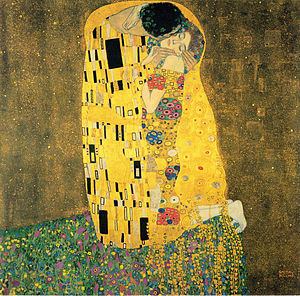
    8 Media Arts: Klimt-inspired Portraits


    "The Kiss" by Gustav Klimt, 1907
    One of the most reproduced paintings
    1. Watch a slide show of past student work.

    2. Read about Gustav Klimt and answer the questions on your worksheet.

    3. Go to Art Lex and search "Art Nouveau." Read and look through examples. Then use the dictionary to complete the Vocabulary section.

    4. Start your design. Watch the demonstrations and follow the directions on your worksheet.
    Klimt's portrait "Adele Bloch-Bauer I" sold for $135 million, the highest price ever reported on a painting

    Tuesday, September 17, 2013

    7 Media Arts: Cartoon Yourself

    This project will introduce you to some basic Photoshop tools and using mouse control. We will use Photoshop to trace a digital photo and show an expressive and emotive cartoon face.

    Look at these examples from last year

    We will practice writing an artist statement to go along with your project.


    Friday, September 13, 2013

    Media Arts Procedures


  • Read through worksheet
  • Log on to assigned computer
  • Complete the worksheet. You will need this link and the flashcards:


  • Writing Practice: How to be a Critical Viewer

    Go to this link. Choose one cigarette advertisement and answer the questions on the screen. When you are finished, sign up on the board so Ms. Fowler can come and print it. Grab it from the black and white printer, sign your name, and put in the HAND IN WORK basket.

    Try it:

    Try these Media Arts activities: Media Studio

    Saturday, August 31, 2013

    Media Arts Introduction Videos

    Portfolio of Media Arts, Polyester Studios
    Portfolio of Motion Graphics

    One Minute Movie: The History of Media
    Extra time activities: Media Studio
    Elements of Media Arts: Discuss and look at "LMG" by Matt S.


    Painting and Drawing, Intro


    Welcome to painting and drawing.

    Art is not just about having a great piece of work at the end, it is about the process and what you learn and discover along the way.

    For our first exercise, see what you can discover...


    Instant Face Maker from FaceHeads on Vimeo.

    7th Media Arts, Student Stew


    Student Stew
    1.  Answer the questions on the form
    3.  Create a design with your answers

    Planner: Write the definition to “typography”

    8th Media Arts, Classmate Collage

    Classmate Collage (What is a collage?)
    1.  Interview a partner
    2.  Use their answers to create a collage
    3.  Introduce them to the class

    Planner: Write the definition to “collage”

    6th Media Arts, Coat of Arms


    Student Scavenger Hunt
    1. When Ms. Fowler says go, take your sheet and something to write with around the room. 
    2. Ask everyone questions. Find someone to sign each category
    Introduction "Coat of Arms"
    1. Read about the meaning of a "coat of arms"
    2. How can you show your personality and what is important to you?
    3. Use symbols and colors in each panel
    4. We will use these to introduce a partner to the class.
    Planner: Write the definition to “digital art”

    CA Technology Videos

    CA Technology videos

    Introduction

    Haiku deck presentation


    Friday, May 10, 2013

    7th Media Arts: Design a Magazine cover


    1. Research
    Pick one magazine and answer the questions on your worksheet

    you can use your dictionary application

    3. Sketch your own original magazine cover
    Examples


    4. Start designing in Photoshop

    Thursday, May 9, 2013

    7th Photo Scavenger Hunt


    1. Camera Contract-read and sign
    2. Camera Settings
    3. Macro Photos
    4. Practice uploading photos
    5. Worksheet
      1. Link 1
      2. Link 2
    6. Photo Scavenger Hunt
    7. Create iMovie of photos: Examples
      • Upload photos to computer
      • Watch example movie
      • Import photos to iMovie
      • Edit down to best 10-15 photos
      • Add titles, captions and credits

      Tuesday, May 7, 2013

      6th Media Arts: Mascot Designs

      Columbia Academy needs a mascot! We will be learning Adobe Illustrator to create mascot designs.

      What is a mascot?
      Use the dictionary to write the definitions to you words on your worksheets.

      Brainstorm. Use these links and brainstorm idea designs on your worksheet:
      Mascot Examples 1
      Mascot Examples 2
      HYLANDER MASCOT

      You can start with existing vector graphics from vecteezy.com, but you must alter it to make it your own!

      Wednesday, May 1, 2013

      6th and 7th Media Arts


      Design a cover for next year's planner!
      The winning design will appear on hundreds of student planners!

      8th Media Arts, Soundtrack


      1. Complete the Research and Planning worksheet
      2. Choose a found video to compose music for. It must be 1:30 minutes or longer.

      Monday, April 29, 2013

      8th Media Arts: Nature Quote Designs


      Steps

      1. Pick a nature/spring quote. Find one that is meaningful to you, not too long, and you must include the author. Search on your own, or use these links:
        1. Pintrest Nature Quotes
        2. Quotations Page, nature
        3. Brainy Quote, nature
        4. Earth day quotes
        5. Spring quotes
      2. Take a photograph for the background 
        1. We will try lots of different kinds of shots- First look up each shot here
        2. Ms. Fowler will demonstrate some
        3. Shoot pictures. You will choose one of your photos to use as the background to your quote.
      3. Design in Photoshop 
        1. Use effects, color adjustments and filters
        2. Add your text. You may want to download a custom font. You can find some free fonts here. Or any of the other "Free font" links on the right-hand side.
      4. When we are finished we will save as "YourLastName Quote.psd" to the HAND IN WORK folder, and save it in your own folder.
      5. Write an artist statement
      6. Display and critique
      *If you have extra time, go to

      Friday, April 26, 2013

      6th Media Arts, Digital Cartoons


      For this project you will design cartoon characters, then choose one to make into a digital comic strip.


      2. Brainstorm characters and cartoons. Draw a different design in each box of your brainstorming worksheet.

      3. Try these online games
           Domo Animate

      4. Illustrator Tools practice

      5. Design your frames


      6. Create your movie


      Videos:


      Monday, April 15, 2013

      8th Self-Portrait Photography


      1. Complete the photography worksheets using these two links:

      2. Check out cameras. Follow Ms. Fowler's directions on setting up your camera

      3. Take 20 to 30 pictures that show who you are. Try close-ups, blurry or out of focus shots, different expressions, disguises, etc. You are trying to show the real you. Delete the pictures you don't like.

      4. Import pictures to your computer

      5. Create a collage designs of your photos using Photoshop. You can cut your pictures up, add words, repeat things, change the color, etc. The size should be "U.S. Paper" or 8.5 inches wide by 11 inches tall. 300ppi.

      6. Save your collage to the HAND IN FINAL WORK folder as "YourLastNameCollage".


      Have fun!

      Thursday, April 11, 2013

      6th Legendary Creatures


      Introduction
      We will write a story about a made-up Legendary Creature, then use Adobe Photoshop to collage together photos to illustrate our creature. Here are some examples from last year.

      Directions

      1. Vocabulary
      Use the Dictionary application for Vocabulary words

      b. Myths, Legends, Fables and Folklore (answer the questions in your packet)
      c. Look at these professional examples:
      Photoshop Animals 1

      3. Sketch
      Sketch in your packet

      4. Write
      Follow the directions on your worksheet, and us MSWord to write your legend.

      5. Design
      Go to Morguefile.com to collect your photos

      *Extra time activities: go to Remix Art Studio or Pixlr-o-matic