Wednesday, February 5, 2014

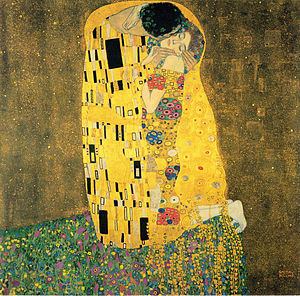
8th Media Arts: Klimt-inspired self portrait

Research: Writing Activity: "The Kiss" by Gustav Klimt
Go to schoology.

1. Read about Gustav Klimt and answer the questions on your worksheet.

3. Go to Art Lex and search "Art Nouveau." Read and look through examples. Then use the dictionary to complete the Vocabulary section.
Art Nouveau video

4. Start your design. Watch the demonstrations and follow the directions on your worksheet. Video: How to use patterns in Photoshop
Klimt's portrait "Adele Bloch-Bauer I" sold for $135 million, the highest price ever reported on a painting

Thursday, January 30, 2014

Wednesday, January 29, 2014

Painting and Drawing, Intro Exercise


Welcome to painting and drawing.

Art is not just about having a great piece of work at the end, it is about the process and what you learn and discover along the way.

What are 8 ways to look at Art?

For our first exercise, see what you can discover...


Monday, January 20, 2014

Digital Art Lab Procedures


  • Read through worksheet
  • Log on to assigned computer
  • Complete the worksheet. You will need this link and the flashcards:


  • Writing Practice: How to be a Critical Viewer
    Go to this link. Choose one cigarette advertisement and answer the questions on the screen. When you are finished, sign up on the board so Ms. Fowler can check it.

    Try it:
    Try these Media Arts activities: Media Studio

    Wednesday, January 8, 2014

    Jan. 14: 7th Media Arts

    Please try one of the activities below. If you need to create an account, log in with your school Google account-or Heights Apps account (your username + @heights.apps.isd13.org). You will have to save and share your project with me. You can post the link into a comment below, or email me the link: fowlerj@colheights.k12.mn.us.

    Choose One:
    1. Create a movie using ZimmerTwins
    2. Make an animation using Scratch
    3. Make a movie using GoAnimate 
    4. Make a Flipbook Animation
    5. Make an animation using DomoAnimate
    6. Make a movie using Dvolver
    7. Make a comic using Comic Creator
    8. Make a video using Wideo
    9. Create some Gifs using Gifpal
    10. Create an animation using PowToon

    Thursday, December 19, 2013

    Painting and Drawing: Close Up

    We will study "hyper-realism", the work of artist Chuck Close, and create our own close up drawings.

    1. Presentation 1:

    Student examples

    2. Presentation 2: Hyperrealism Examples.
    3. Other examples: Photorealism Presentation. Chuck Close presentation
    4. Research.
         Go to the Guggenheim website. Pick one work of art and answer the questions on your worksheet.
         Go to ArtsConnectEd: Chuck Close. Answer the questions on your worksheet
    5. Videos
    Chuck Close: Letter to my Younger Self
    Chuck Close and the Grid
    - Chuck Close: A Portrait in Progress Trailer
    Duane Hanson: Woman Eating

    6. Practice drawing using a grid
    7. Take a close up picture (your face must fill the frame)
    8. Create grid
    9. Draw, shade and add detail
    10. Artist statement, Critique and present
    "Frank" by Chuck Close, at the Minneapolis Institute of Arts
    Other PhotoRealism artists

    Monday, December 9, 2013

    AmE: Arts meets Engineering Conference

    Columbia Academy Arts and Engineering classes are holding the 2nd annual Arts meets Engineering conference. This year's theme is "movement".

    Proceeds from the conference will go to SACA the local food shelf. Here is a video with Dave from SACA.


    Art Making Machines

    Videos
    1
    2
    3
    4
    5

    6th Media ARts: Sketch-Up Sculture

    Ms. Fowler and her son with Claes Oldenburg
    sculpture at the Walker Art Center

    Research: 


    Go to THIS PAGE for sculpture videos and examples. Ms. Fowler will present.

    Walker Sculpture Garden
    Franconia
    Olympic Sculpture Park

    Outdoor Sculptures

    Design:

    Google Sketch-Up tutorial video

    Extra Time games:

    HomeStyler
    Architect Studio 3D (might not work)
    My Imaginary City


    Friday, December 6, 2013

    8th Media Arts: Fortune Cookie Posters

    We will learn the basics of Adobe Illustrator and design posters. You will get a fortune cookie, and you must create an interesting, dynamic, eye-catching design. Use what you learn about composition, fonts and typography.

    Research and Planning


    1. What is Typography? Presentation
    2. The History of Typography Video
    3. Go to some of the free font websites and download some fonts you may want to try (in addition to the ones on your computer.
    4. Text effects practice. Tutorial video1. Video 2.
    5. Select a random cookie. What you get is what you get!
    6. Sketch your design. It could be a drawing or interesting type or a combination of both.

    Look at these websites for some inspiration:

    Pintrest Fortune Cookie Poster Ideas

    Design. Follow the directions on your worksheet.

    Extra time activities
    thetypefight.com
    Shape type
    Kern type


    Thursday, December 5, 2013

    7th Media Arts: Stop Motion Animation

    Research

    1. Watch some stop-motion examples: Stop-motion Animations

    Planning

    1. Draw your storyboard
    2. Form groups of 3 or 4.
          Person 1- Director: Oversees the filming and production. Follows the storyboard.
          Person 2- Camera-person: Makes sure each shot is properly lit, in focus and steady.
          Persons 3 (and 4)- Actors: Either act in the movie or control the set/characters/objects.

    Create

    1. Make your set, characters, lettering, and anything else you need.
    2. Create a title sequence
    3. Take pictures
    4. Edit your photos in iMovie

    Friday, November 15, 2013

    8th Media Arts: GarageBand


    1. Complete the Research and Planning worksheet
    2. Choose a found video to compose music for. It must be 1:30 minutes or longer.

    Wednesday, November 13, 2013

    Tuesday, November 12, 2013

    Painting and Drawing: Minimalism


    1. Watch presentation on Minimalist Art

    2. "The Dot" Read together

    3. Videos- Richard Serra, Susan Rothenberg

    4. Design: Minimalist posters for children's books, Minimal TV show posters

    5. Research "Minimalism" on your own using these websites: Moma website, MOCA Museum. Use MS Word to type a persuasive paragraph, trying to convince me that Minimalism is or isn't art.

    6. Minimalist Animation1, Minimalism Animation 2

    7. Sketch your ideas for a "minimalist" painting

    8. Create a color mixing practice painting

    Monday, November 4, 2013

    7th and 8th Media Arts: WallWisher

    Directions
    1. First. you will need to be logged on to your Google account.
              - Go to heights.apps.isd13.org
              - Use the same log in as your computer log in
    2. Then go to http://wallwisher.com/
    3. Click on "Build A Wall"
    4. Title it with your name
    5. Add your question in the description. Make your question something creative. For example: "If you discovered a planet, what would you name it?" or "If you could travel to any city in the world, where would you go?" or "If you had to eat one thing everyday, what would it be?"
    6. Click on "wallpaper" and choose a background
    7. Click on privacy and change the settings to "anyone", if you need too.
    8.  Click on "address" and select and copy the address
    9. Now go to cagallery.blogspot.com
    10. Find the post that says "wall wishers assignment" (first one)
    11. Go to the bottom and "add a comment"
    12. Paste your wall's address
    13. Ask at least 10 people to visit your wall and answer your question

    Wednesday, October 30, 2013

    Monday, October 28, 2013

    Painting and Drawing: Zentangle Landscapes


    1. First research "Folk Art" Use the links below
    1. What is a zentangle?
    2. Research Zentangle patterns
    3. Sketch 12 designs. Use care, be neat and precise.
    4. Start on your landscape design. Follow Ms. Fowler's demonstration.
    Outsider ART Interactive Game

    Thursday, October 24, 2013

    6th Legendary Creatures


    Introduction
    We will write a story about a made-up Legendary Creature, then use Adobe Photoshop to collage together photos to illustrate our creature. Here are some examples from last year.

    Directions

    1. Vocabulary
    Use the Dictionary application for Vocabulary words

    b. Myths, Legends, Fables and Folklore (answer the questions in your packet)
    c. Look at these professional examples:

    3. Sketch
    Sketch in your packet

    4. Write
    Follow the directions on your worksheet, and us MSWord to write your legend.

    5. Design

    Monday, October 21, 2013

    7th Media Arts: Fashion and Pattern design


    Research


    Try the two activities linked from caarts.blogspot.com
    1. Symmetry Activity
    2. Organic and Geometric Shapes
    3. Patterns 
    4. Practice making some patterns
    Now lets look at some examples of print and pattern designs. Go to: Print and PatternLook through all of the examples (you can also go through the archives). Pick 3 and describe them. 
    Follow the directions on your worksheets to design 3 different patterns and apply them to 3 different items. Have fun!

    NEXT: Create an original fashion design! Ms. Fowler will give you directions

    Champion Hoodie Remix (design a hoodie)
    Nike iD (design a shoe)

    Thursday, October 10, 2013

    Painting and Drawing: Collage Portraits

    1. Watch presentation and take notes
    Mark Bradford videos, Mark Bradford Vimeo
    Romare Bearden

    2. Explore these websites:
    Romare Bearden website
    Collage Maker

    3. Take a picture of yourself. Save it to the Fowler>Classroom>Paint/Draw folder. Ms. FOwler will print it. Trace onto white paper.


    Extra Credit: Humanimal collage

    Monday, October 7, 2013

    8th Media Arts: Alice in Wonderland Posters


    Your class has been hired to design posters for the musical "Alice in Wonderland Jr.".

    Research 
    First watch some movie clips and look at what other designers have done.

    Links

    Video Clips

    Plan
    Sketch an idea. You can design using copy-right free photos, or scan a drawing and edit on the computer

    Design
    Start by using the template. Go to Fowler-Classroom > Materials and copy the poster template to the desktop.

    Evaluate and Critique.
    One winner (or more) will be chosen to print professionally. Write an artist statement and do an online critique.

    Friday, October 4, 2013

    7 Media Arts: Photo Scavenger Hunt


    History of Photography Video

    1. Camera Contract-read and sign
    2. Camera Settings
    3. Macro Photos
    4. Practice uploading photos
    5. Worksheet
      1. Link 1
      2. Link 2
    6. Photo Scavenger Hunt
    7. Create iMovie of photos: Examples
      • Upload photos to computer
      • Watch example movie
      • Import photos to iMovie
      • Edit down to best 10-15 photos
      • Add titles, captions and credits

      Tuesday, October 1, 2013

      6th Media Arts: Creature Photographs

      Creature Photographs
      1. Make a monster
      2. We will photograph our monsters in the wild! You must photography your monster in a minimum of 5 different habitats
      3. Make a slideshow

      Here are some links to help inspire you:
      Lots of monsters
      More Monsters


      Monday, September 30, 2013

      Painting and Drawing, Oct. 1

      1. Finish your "expand a picture"
      2. Contour line drawing

      3. Drawing animals using basic shapes
      4. Animal practice
      5. Charcoal value scale


      Tuesday, September 24, 2013

      Sept 27, 8 gold 2. Be a Media Critic

      8th graders, YOU HAVE NEVER DONE THIS PACKET! Don't even try to act like you have. You can work in partners or alone. Use headphones if you have them. This packet must be completed by the end of class, or it's a zero!!!

      Go to Artopia to complete the packet.

      Watch the One Minute Movie

      1. Click on "photography." Choose 1 photograph and write about what you see on your worksheet.
      2. Click on "do more", the "write about it." Write about how 2 different elements or principles of design are used.
      3. Write your opinion of the photo in complete sentences.

      4. Listen to one radio production and write about what you hear
      5. Write about how the producer expresses the message
      6. Write about your opinion of the production

      7. Choose a film and make a list of what you see
      8. Click on "more" under your film clip, the click on "do more," then "write about it." How are two elements or principles used? (use the "word back if you need too)
      9. What is your opinion and how did it make you feel?


      10. Choose a TV clip and make a list of what you see
      11. Click on "more" under your film clip, the click on "do more," then "write about it." How are two elements or principles used? (use the "word back if you need too)
      12. What is your opinion and how did it make you feel?


      13. make a list of what you see and hear
      14. How are two elements or principles used? 
      15. What is your opinion and how did it make you feel?

      Sept. 27, 7gold 3

      1. Finish your "Cartoon Yourself " project.
      2. Open MS Word and write an artist statement to go online with your project. It must be one paragraph- a minimum of 3 sentences.

      • You might want to write about what you learned (vocabulary words, software, tools, etc). You could write about what you think you did well or what you could improve. You could write about why you chose the expression you did, or what background details you chose to include. It is up to you what you want to share in your artist statement with the viewer.

      3. If you finish, download another photo and create a cartoon out of it. You could chose an animal, a celebrity, or some kind of scene. You can download copyright free photos from morguefile.com ( we will talk more about copyright law later).

      Monday, September 23, 2013

      8 Media Arts: Klimt-inspired Portraits


      "The Kiss" by Gustav Klimt, 1907
      One of the most reproduced paintings
      1. Watch a slide show of past student work.

      2. Read about Gustav Klimt and answer the questions on your worksheet.

      3. Go to Art Lex and search "Art Nouveau." Read and look through examples. Then use the dictionary to complete the Vocabulary section.

      4. Start your design. Watch the demonstrations and follow the directions on your worksheet.
      Klimt's portrait "Adele Bloch-Bauer I" sold for $135 million, the highest price ever reported on a painting

      Tuesday, September 17, 2013

      7 Media Arts: Cartoon Yourself

      This project will introduce you to some basic Photoshop tools and using mouse control. We will use Photoshop to trace a digital photo and show an expressive and emotive cartoon face.

      Look at these examples from last year

      We will practice writing an artist statement to go along with your project.


      Friday, September 13, 2013

      Media Arts Procedures


    • Read through worksheet
    • Log on to assigned computer
    • Complete the worksheet. You will need this link and the flashcards:


    • Writing Practice: How to be a Critical Viewer

      Go to this link. Choose one cigarette advertisement and answer the questions on the screen. When you are finished, sign up on the board so Ms. Fowler can come and print it. Grab it from the black and white printer, sign your name, and put in the HAND IN WORK basket.

      Try it:

      Try these Media Arts activities: Media Studio