Monday, January 30, 2012

Saturday, January 28, 2012

Welcome to Media Arts

1. What is Media Arts? (One minute movie)

2. Classroom Expectations. Read and sign.

3. Work in groups to create Media Arts posters. Share.

Friday, January 13, 2012

DVD Cover Designs


Directions for DVD Portfolios
It is nearing the end of the semester, and time for you to create a portfolio so you can take your work with you. Portfolio means a collection of creative work.
Ms. Fowler will burn a DVD of everything that is in your folder (with your last name), in your class folder. Make sure all of your projects are copied there!

Design a Cover for your DVD

You can choose to use either Photoshop or Illustrator. You can design everything on the computer, or scan a drawing in first.
1.     Sketch your design on paper
2.     Create a new file that is 5 inches wide by 4.75 inches tall. If you are working in Photoshop, make the resolution 300 dpi.
a.     You must include:
·       Your full name
·       Your grade
·       "Portfolio"
3. Your design should show your personality. You could include pictures of your artwork. Try different fonts and if you use images from the internet, they must be copyright free (try morguefile.com).
4. Hand in your design to the "HAND IN FINAL WORK HERE" folder. Ms. Fowler will print your design in color for your DVD case.

7th Digital Arts, Cyberbullying and Digital Citizenship


Cyberbullying and Digital Citizenship

2. Go to MTV's A Thin Line and answer the questions on your worksheets
3. Watch "Lets Fight it Together." Answer the questions on your worksheet.
4. Look at this example "friendbook" profile and answer the questions on your worksheet.
5. Take the Cyberbullying Quiz
6. Explore some of the resources below


Links to Resources:
NSTeens (Great videos on digital citizenship issues and "real stories")
Digizen (UK)
THINKUKNOW (divided by age)

6th Media Arts, A Lesson on Copyright

Go to this link to answer the questions on your worksheet.

Monday, January 9, 2012

8th Media Arts, Be a Media Critic

Go to Artopia to complete the packet.

Watch the One Minute Movie

Click on Be a Media Critic
Photography
1. Click on "photography." Choose 1 photograph and write about what you see on your worksheet.
2. Click on "do more", the "write about it." Write about how 2 different elements or principles of design are used.
3. Write your opinion of the photo in complete sentences.

Radio Production
4. Listen to one radio production and write about what you hear
5. Write about how the producer expresses the message
6. Write about your opinion of the production

Film Production
7. Choose a film and make a list of what you see
8. Click on "more" under your film clip, the click on "do more," then "write about it." How are two elements or principles used? (use the "word back if you need too)
9. What is your opinion and how did it make you feel?

Vintage Television

10. Choose a TV clip and make a list of what you see
11. Click on "more" under your film clip, the click on "do more," then "write about it." How are two elements or principles used? (use the "word back if you need too)
12. What is your opinion and how did it make you feel?


Electronic Arts- Keep it Real Website
13. make a list of what you see and hear
14. How are two elements or principles used? 
15. What is your opinion and how did it make you feel?

Wednesday, January 4, 2012

8th Media Arts, GarageBand


1. Complete the Research and Planning worksheet
2. Choose a found video to compose music for. It must be 1:30 minutes or longer.

Tuesday, January 3, 2012

7th Digital Arts: Beautiful Barcode designs

1. What is a barcode? Definition

2. Link to the article and examples here Barcode article

3. Japanese barcode design firm
    More examples HERE

4. If you need a symbol to incorporate into your barcode, try downloading from The Noun Project

Follow the directions on your worksheet to design your "Beautiful Barcode"

Tuesday, December 13, 2011

7th Media Arts, Dream Destination Prezi


  • Vocabulary (use dictionary application)
  • Planning

1. Pick a city in a foreign country, try Wikimapia or Google Maps
2. Use Google image search and save a map of your country, showing your city
3. Look up the weather for each season. Google your city and "average weather" or try World Climate
4. Look up your city's history
5. Google arts and culture questions
6. Look up major attractions in your city
7. Find the average flight cost. Try google, or the travel sites KAYAK or Priceline.com
8. Find an average hotel cost

9. Now save pictures for your presentation to your folder
10. Use prezi.com to design your presentation. The log in information is on your worksheet.

Sunday, December 11, 2011

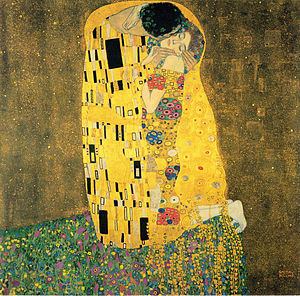
8th Digital Art: Klimt Project

1. Look at some project examples here: Project Description. We will be making ours using Adobe Photoshop

2. Read about Gustav Klimt and answer the questions on your worksheet.

3. Go to Art Lex and search "Art Nouveau." Read and look through examples. Then use the dictionary to complete the Vocabulary section.

4. Start your design. Watch the demonstrations and follow the directions on your worksheet.
Video: How to use patterns in Photoshop


Friday, December 9, 2011

Thursday, December 8, 2011

6th Media Arts, Architecture

Research and Planning Worksheet:
1. Great Buildings
2. Modern Home Architecture
3. Architect's Handbook

Videos:
Modern Home Architecture
Top 100 Architects Video

Examples:
Floor Plans

Google Sketch Up Houses

Sketch Up Video

6th Media Arts, Extra Credit Project

Dream Lunch!

If you are finished with all of your work, try this extra credit project.

  1. Click on the lunch tray picture, then when the large version loads, right click and save to your desktop
  2. Open it in Photoshop
  3. Find pictures of your favorite foods (you can use Google for this project only. Click on "large" size so your pictures aren't blurry)
  4. Cut and paste your foods on to your lunch tray


Tuesday, November 22, 2011

Painting and Drawing, Advertisements

1. Painting videos:
2. Finish sketching your advertisement full size in pencil. You must include:
    • A Picture of the product
    • An original brand name
    • A slogan
    • Something that persuades the viewer to buy it
3. Show Ms. Fowler, when it is approved you can start painting

Wednesday, November 16, 2011

6th Grade, Legendary Creatures

1. Use the Dictionary application for Vocabulary words

2. List of cryptids (legendary creatures)

3. Aesop's Fables

4. Photoshop Animals 1
    Photoshop Animals 2

5. Morguefile.com to collect your photos

8th Media Arts, Stop-Motion Animation

Do now:
Answer question, share at tables.

Activities:
We will begin a stop-motion animation project.
Stop-motion examples:

Form groups of 3 or 4.
Person 1- Director: Oversees the filming and production. Follows the storyboard.
Person 2- Camera-person. Makes sure each shot is properly lit, in focus and steady.
Persons 3 (and 4)- Actors: Either act in the movie or control the set/characters/objects.

First we will make our sets and take photos. Then you will follow the steps on your worksheet to make your animation in iMovie. Ms. Fowler will give you a demonstration.

If you finish early, try these games: Flipbook Animate Sketch Star Toy Theater Stop Motion Animation

Tuesday, November 15, 2011

7th Media Arts, Winter Choir Program Video and Cover

Start Choir Program Video:

You can work with a partner. Use the links below to complete the worksheet.

2. Brainstorm a list of images you could use. They can be literal or abstract.
3. Download images from HERE and HERE
4. Use Photoshop to add effects to your pictures
5. Put together your video using iMovie. Ms Fowler will demonstrate.
Choir Program Cover 

Design a cover for the program cover. Everyone will make their own design.

Here is the information for the concert program:

Columbia Academy
Department of Music Presents:

Winter Choir Concert
Monday, December 19, 2011
6:30pm
Columbia Academy Gymnasium
You illustration could have something to do with "winter," or the song we are using


Monday, November 14, 2011

Nov. 21, 6th Media Arts

Do now:
Answer the daily question, Sit at tables
Attendance and Announcements, Greeting: Table share
Activities
  • Present and critique comic movies to Ms. Marx's class. 
    • Practice with a partner. Present by saying your name, the title of your movie and something about it (could be something you learned, something you found difficult, something about the story, etc.)
  • Demonstration on starting your own blog
  • Start designing and uploading your art work
Planner: Tape you Heights Apps log-in information into your planner

Friday, November 11, 2011

Painting and Drawing: Advertising

Day 1: Research and Planning
Vocabulary
A. PBS Kids Ad Detective
B. Buying Smart

C. Commercials
  1. commercial 1
  2. commercial 2
  3. commercial 3
  4. commercial 4
  5. commercial 5
  6. commercial 6
-Bonus commercial

Day 2: Research your product and painting techniques

Go to the goole search bar and look for pictures of your product and examples of advertising. Use these as inspiration and to draw from. You can copy and paste one pages worth of pictures using "Word" to print. Tell Ms. Fowler when you are ready to print. Only she will print.

Painting videos:
Margaret Kilgallen

Monday, November 7, 2011

Nov 16, Painting and Drawing


Do Now:
Sit at assigned table, Get supply bin for your table
Attendance and Announcements

Activities
  • Start "Advertising in Art" project.
  • Go to the computer lab to complete the Research and Planning
Hand painted signs:

Tuesday, November 1, 2011

Nov 18, 8th Media Arts - ALADDIN Posters

Do now: Answer the daily question, Sit at tables
Greeting- table greeting share, Attendance and Announcements
Activities:
  • We will finish and hand in your Aladdin posters today!
  • Finish 3 sketches and research. 
  • Work on you design on the computer
Use the images below (provided by Ms. Mahler) for inspiration.


Some images you could search:
camels
monkey
desert
Use these KEY WORDS 


Monday, October 31, 2011

Nov 10, 6th Media Arts


Do now:
Answer the daily question, Sit at tables
Attendance and Announcements, Greeting: Table share
Activities
  • Continue working on your digital comic strip
  • Demonstration in iMovie, follow step by step
  • Hand in movies


Planner: Write the steps of the "Design Process"